
I remember the first time I switched my personal Instagram account to a Business one. My feed felt the same, my photos were untouched, but then I noticed it: a new, slightly intimidating option in my settings called “Business Chat.” My mind raced. Was this a separate app? A new way for corporate suits to slide into my DMs? Would my casual chats with friends now have an automatic “Sincerely, [My Name]” signature? I was confused, and if you’re here, you probably are too. Don’t worry—it’s not as complicated as it sounds, and it’s a game-changer for anyone using Instagram for more than just memes.
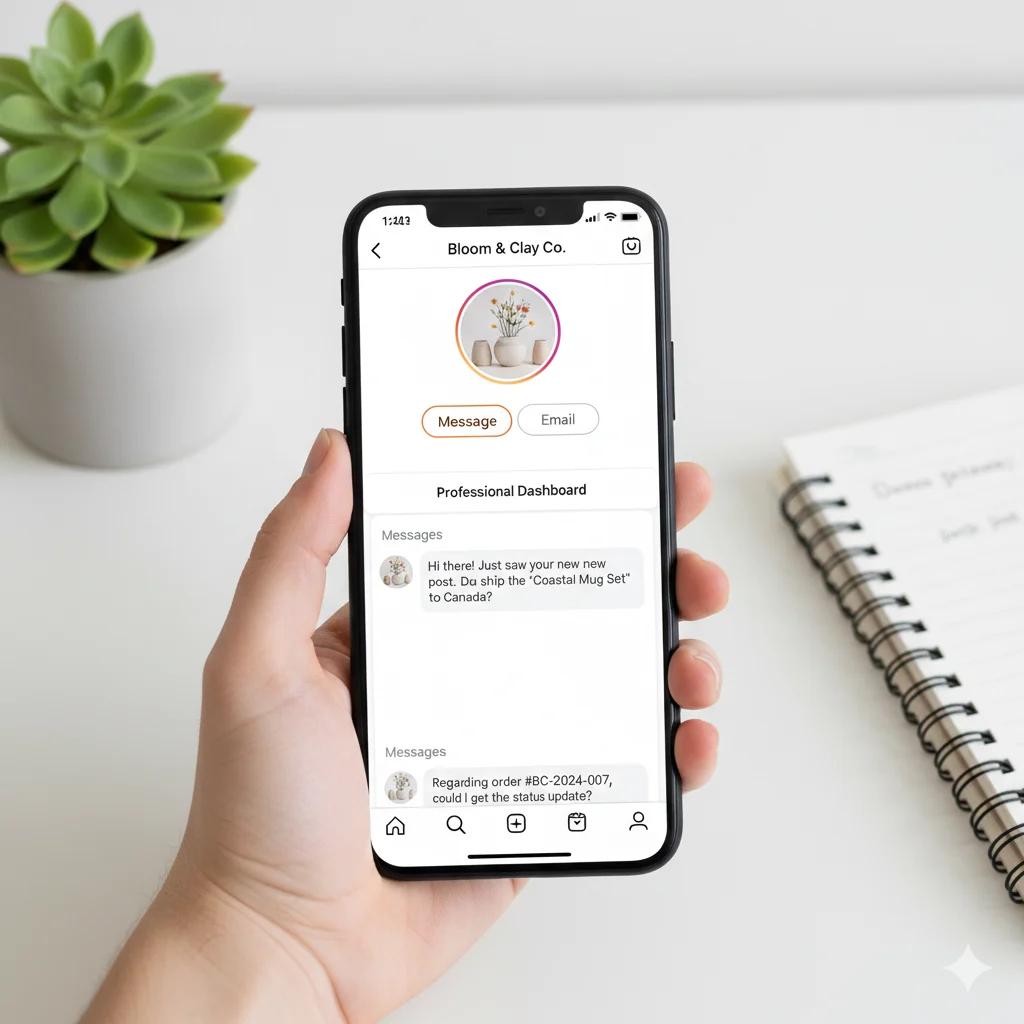
Business Chat on Instagram is a dedicated messaging feature for Business and Creator accounts. It’s a professional, customer-service-oriented tool that allows businesses to manage inquiries, automate responses, and connect with customers directly through the platform.
🧠 What Does Business Chat Mean on Instagram?
In simple terms, Business Chat is the specialized inbox and suite of messaging tools available to Instagram Business and Creator accounts. It transforms your standard Direct Message (DM) inbox into a powerful customer relationship hub. While anyone can send a DM, Business Chat provides the structure and features needed to handle those messages professionally and efficiently.
Think of it as the difference between a personal mobile number and a business phone line. Your personal DMs are for friends and family. Business Chat is for customers, clients, fans, and collaborators. It’s designed to help you organize, automate, and streamline your professional communications on the platform.
In short: Business Chat = A Professional Messaging Inbox = Managing customer interactions efficiently on Instagram.
📱 Where Is Business Chat Commonly Used?
Business Chat is exclusively available to:
- Instagram Business Accounts: For brands, stores, freelancers, and local businesses.
- Instagram Creator Accounts: For public figures, content creators, artists, and influencers.
It’s integrated directly into the standard Instagram Direct Message inbox, but its powerful features are accessed through the Instagram Meta Business Suite on desktop or mobile. This is where the magic happens! It’s designed for professional contexts and is essential for:
- 💰 E-commerce Stores answering product questions.
- 🎨 Freelancers discussing project details with clients.
- 🎵 Musicians managing booking inquiries.
- 📣 Influencers handling brand collaboration offers.
- 🏢 Local Businesses sharing hours, directions, and taking reservations.
💡 Why Did Instagram Create Business Chat?
Instagram isn’t just a photo-sharing app anymore; it’s a bustling digital ecosystem. The platform recognized that millions of users were already using DMs to interact with brands. Business Chat was developed to formalize this process, providing tools that benefit both the business and the customer. It reduces friction, keeps conversations organized, and helps businesses convert browsing into buying without ever leaving the app.
🔧 How to Set Up and Enable Business Chat
Getting started is straightforward. First, you must switch your personal account to a Business or Creator Account in your Instagram settings. Once that’s done, Business Chat is automatically enabled. The real setup involves customizing its features within the Meta Business Suite:
- Set up Automated Responses: Create instant replies for when you can’t respond immediately.
- Create a Welcome Message: Greet new conversations with a friendly, branded message.
- Organize with Labels: Use labels like “New Order,” “Support,” or “Completed” to sort your chats.
- Add Quick Replies: Save and use pre-written answers to frequently asked questions.
💬 Examples of Business Chat in Conversation
Seeing Business Chat in action makes its value clear. Here’s how it looks in real-world scenarios.
Example 1: Customer Inquiry for a Product
Customer: Hi! I love this ceramic mug in your post. Is it dishwasher safe?
Business (using a Quick Reply): Hi there! Thanks for your interest! 😊 Yes, all our ceramic mugs are dishwasher and microwave safe. You can find it here: [link to product]. Let me know if you have any other questions!
Example 2: An Influencer Managing a Collaboration
Brand: Hello! We love your content and think you’d be a great fit for our new skincare launch. Are you open to collaborations?
Creator: Hi! Thank you for reaching out, I’m a big fan of your products! 🙌 Please send over the campaign details to my email: [professional email address]. Looking forward to it!
Example 3: Using an Automated Instant Reply
Customer (sends a message after business hours): What are your store hours this weekend?
Business (Auto-Reply): Thanks for your message! We’re currently away but will get back to you first thing in the morning. Our regular hours are 9 AM – 6 PM, Monday-Saturday. For urgent queries, visit our FAQ page: [link].
Example 4: A Freelancer Onboarding a Client
Client: I saw your design portfolio and would like to discuss a logo for my new startup.
Freelancer: That’s great! I’d love to learn more about your project. Could you tell me a bit about your brand vision and timeline? I’ve also attached my service guide PDF with packages and pricing.
✅ When to Use and When Not to Use Business Chat
Understanding the context is key to using this tool effectively.
✅ When to Use Business Chat:
- For Customer Service: Answering questions about products, services, or policies.
- To Generate Sales Leads: Responding to inquiries and guiding potential customers.
- Managing Collaborations: Discussing terms with brands or other creators.
- Sharding Important Updates: Sending order confirmations, shipping updates, or appointment reminders.
- Building Community: Engaging with your audience in a more personal, yet professional, way.
❌ When Not to Use Business Chat:
- For Highly Sensitive Information: Avoid sharing contracts or personal data; move to a more secure, formal channel like email.
- For Lengthy, Complex Negotiations: Detailed contracts are better handled over email or video calls.
- As a Replacement for a CRM: For very large volumes, a dedicated Customer Relationship Management system is more powerful.
- For Personal Chats with Friends: Keep your professional and personal communications separate.
| Context | Example Phrase | Why It Works |
|---|---|---|
| Customer Inquiry | “Hi! The estimated delivery for that item is 3-5 business days. We can expedite it for an extra fee!” | Prompt, helpful, and offers an upsell opportunity. |
| Formal Work Proposal | “Thank you for the proposal. I have reviewed the contract and will return a signed copy via email by EOD.” | Acknowledges the DM but moves the formal action to a more appropriate platform (email). |
| Quick FAQ | “Our return policy is 30 days with receipt. The full details are here: [Link]” | Efficiently uses a Quick Reply to save time for both parties. |
🔄 Similar Features and Alternatives to Instagram Business Chat
While Instagram Business Chat is powerful, it’s part of a broader landscape of professional messaging tools. Here’s how it compares to other platforms.
| Platform/Feature | Primary Use Case | Key Difference |
|---|---|---|
| Instagram Personal DMs | Casual, social conversations with friends and followers | Lacks automation, organization, and professional tools. |
| Facebook Business Messenger | Customer service and engagement on Facebook | Very similar to Instagram Business Chat; often linked through the same Meta Business Suite inbox. |
| WhatsApp Business App | Direct customer communication, especially globally | Standalone app focused purely on messaging, with strong catalog and payment features. |
| Email Marketing | Formal communication, newsletters, long-form updates | More formal, better for mass communication, but less immediate. |
| Slack / Microsoft Teams | Internal team collaboration within a company | Designed for workplace communication, not for public customer-facing interactions. |
🤔 FAQs
1. Is Business Chat free to use?
Yes, the Business Chat feature itself is completely free. It is a native part of having an Instagram Business or Creator account. You don’t pay Instagram to send or receive messages.
2. Can I turn off Business Chat?
You can’t “turn off” Business Chat without switching back to a personal account. However, you can disable specific features like Automated Responses and Quick Replies within your settings.
3. Do people know they’re messaging a Business account?
Yes, your profile will clearly display a “Message” button, and your category (e.g., “Professional Account” or “Business Account”) is often visible. The conversation feels the same to the user, but your tools on the backend are much more powerful.
4. What’s the difference between a Quick Reply and an Automated Response?
An Automated Response (or Instant Reply) is sent automatically when someone starts a new conversation with you, often when you’re away. A Quick Reply is a saved message template that you, the business, can choose to send manually with a shortcut to save time.
💎 Conclusion:
Ultimately, understanding what Business Chat means on Instagram is the first step toward leveraging its power. It’s not a scary, corporate tool but rather an essential upgrade for anyone serious about building a brand, growing an audience, or selling products on the platform. By organizing your inbox, automating simple tasks, and providing prompt, professional communication, you build trust and authority with your audience. If your Instagram is more than a hobby, enabling a Business account and mastering Business Chat isn’t just a recommendation—it’s a necessity for modern digital success.

Charles Dickens was a legendary English novelist and social commentator known for his timeless storytelling and deep understanding of human nature. His works continue to inspire writers and readers worldwide, shaping literature, culture, and modern narrative craft.